Content Summary
Introduction
Migrating a WordPress website might sound simple, but a single mistake can lead to broken links, missing content, or performance issues. Whether you’re switching hosting providers, upgrading your infrastructure, or moving from another CMS to WordPress, a well-planned migration process ensures everything runs smoothly.
I provide WordPress migration services for agencies and businesses of all sizes — from small local sites to complex multisite networks — ensuring minimal downtime, preserved SEO rankings, and full compatibility with the new environment.
If your migration also includes creating a custom theme or plugin adjustments, you may find these articles helpful:
➡️ Custom WordPress Theme Development: From Design to Fully Functional Website
➡️ Custom WordPress Plugin Development: Turning Unique Ideas into Powerful Tools
Types of WordPress Migrations I Handle
Over the years, I’ve migrated websites across dozens of environments and CMS platforms.
Typical migration cases include:
- Between hosting providers – e.g., Hostinger → WP Engine, or Kinsta → HostGator.
- From development to production environments – safely moving projects from staging to live.
- From other CMS platforms – converting sites from Wix, Squarespace, or Umbraco to WordPress.
- From legacy WordPress setups – upgrading outdated themes, plugins, or PHP versions.
- To managed WordPress hosting – optimizing performance on platforms like Kinsta, SiteGround, or WP Engine.
Each case is different, but the goal is always the same: a seamless transition, with zero loss of data and full performance continuity.
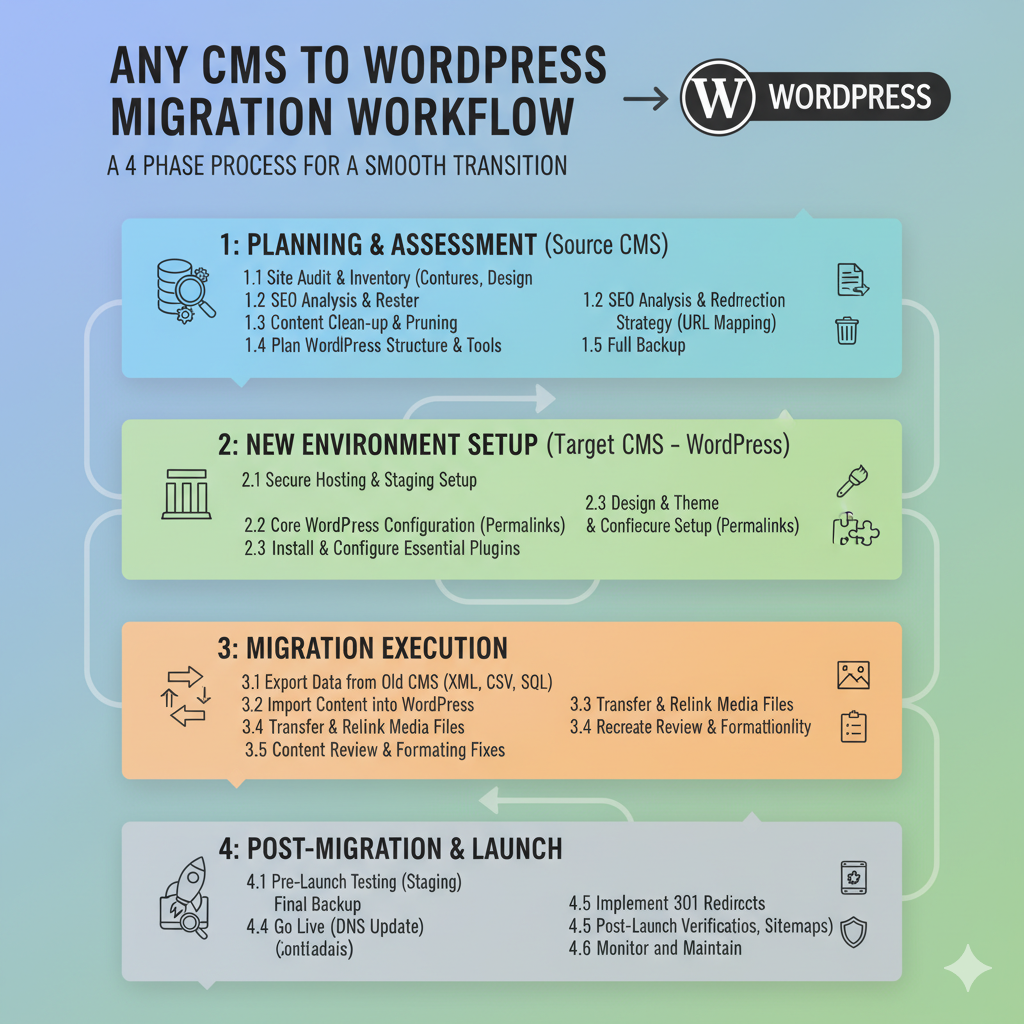
The WordPress Migration Process
A successful migration is a step-by-step process that requires careful preparation and execution.
Here’s how I usually handle it:
1. Initial Assessment
Before starting, I review the existing website structure — themes, plugins, database, server configuration, and any custom code that could affect the migration.
2. Backup and Verification
I perform complete backups of both files and databases. This step ensures that, in the unlikely event of a rollback, no data is lost.
3. Environment Preparation
I configure the new hosting environment according to the website’s requirements — PHP version, database settings, SSL certificate, and caching tools.
4. Migration Execution
Using secure tools (such as SFTP, SSH, or WP-CLI), I transfer the entire site while maintaining URLs, permalinks, and plugin configurations.
For database migrations, I carefully replace URLs and serialized data to avoid errors.
5. Testing and Optimization
After migration, I test every aspect of the site: pages, forms, login areas, and performance metrics.
I also run optimizations — clearing caches, checking redirects, and validating SEO meta data.
6. Launch and Post-Migration Support
Once everything is verified, I point the domain to the new server and provide support during the transition period to ensure everything runs as expected.
Migrating from Other CMS Platforms
Many businesses start with tools like Wix, Squarespace, or Umbraco and later outgrow their limitations.
Migrating to WordPress allows for:
- Full control over SEO.
- Custom themes and plugins for unique functionality.
- Integration with CRMs, email marketing, and automation platforms.
- Long-term scalability and easier content management.
Each migration from another CMS involves rebuilding layouts in WordPress — often as a new custom theme — and sometimes developing custom plugins to replicate features from the original system.
Tools and Technologies Used
I rely on professional and secure tools for WordPress migrations:
- WP-CLI and SSH for fast command-line operations.
- SFTP and Rsync for secure file transfers.
- phpMyAdmin or MySQL Workbench for database management.
- Search-Replace-DB for handling serialized data correctly.
- UpdraftPlus and Duplicator for backup and restore operations.
Each project follows strict data-handling standards to ensure privacy and stability during migration.
Common Challenges and How I Avoid Them
Migrating WordPress sites can involve unexpected issues, especially on older or poorly maintained setups.
Here’s how I handle common challenges:
| Challenge | My Approach |
|---|---|
| Broken links or missing media | Automated URL replacement and content validation. |
| Incompatible PHP or plugins | Pre-migration compatibility testing and updates. |
| Downtime or data loss | Full backups and staged migration. |
| Performance drop after migration | Server-level and plugin optimization post-move. |
These precautions guarantee a smooth transition with minimal impact on visitors or search engines.
Hosting Platforms I Work With
I’ve handled migrations across the most popular WordPress hosting platforms, including:
- Hostinger
- HostGator
- WP Engine
- Kinsta
- Locaweb
- SiteGround
- Cloudways
Each provider has different performance configurations, so I adjust caching, CDN, and SSL settings accordingly after migration.
SEO Considerations During Migration
A successful migration also requires protecting your SEO performance.
During and after the migration, I ensure:
- 301 redirects for any changed URLs.
- Updated XML sitemaps submitted to Google Search Console.
- Canonical tags remain correct.
- Page speed remains optimized.
- Structured data and schema are preserved.
This approach helps maintain rankings and prevents traffic loss.
Working with Agencies and Businesses
For agencies managing multiple client websites, I offer fully managed migration support — coordinating DNS updates, staging setup, and testing on your behalf.
For direct business clients, I handle all communication and ensure that the site remains live and stable during the entire migration.
If needed, I also assist with:
- Theme adjustments after migration.
- Plugin troubleshooting.
- Hosting configuration improvements.
Conclusion
Migrating a WordPress website doesn’t have to be risky or stressful.
With the right preparation, secure tools, and testing process, your website can move to a new platform or server without any disruption.
If you’re planning a migration — or need help rebuilding your website with a custom WordPress theme or custom plugin after the move — feel free to get in touch to discuss your project.