





Content Summary
Headless WordPress is gaining traction among developers and enterprises seeking to decouple the back end from the front end, providing more flexibility in how content is delivered. This approach allows for a more dynamic user experience across various platforms and devices. However, implementing a headless architecture comes with its own set of challenges. In this article, we will explore a comprehensive implementation strategy for headless WordPress, highlighting common mistakes and how to avoid them.
What is Headless WordPress?
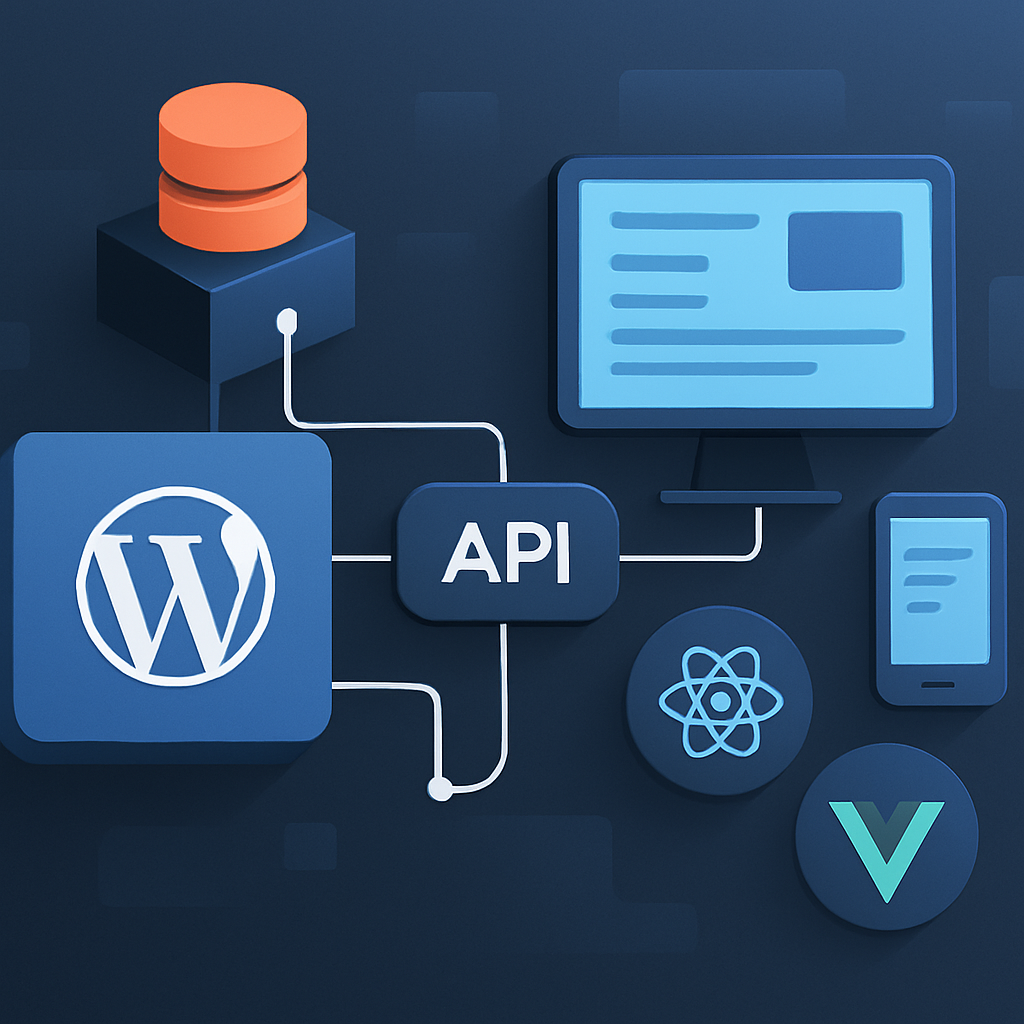
In a traditional WordPress setup, the back end (where content is managed) and the front end (where content is displayed) are tightly integrated. In contrast, a headless WordPress setup separates these two components. The WordPress back end serves as a content management system (CMS) while a different front-end framework (like React, Vue.js, or Angular) handles presentation. Content is delivered via REST API or GraphQL, allowing for more advanced features and better performance.
Benefits of Headless WordPress
- Performance: By decoupling the front end, you can optimize each layer independently, leading to faster load times.
- Flexibility: You can use any front-end technology, enabling better user experiences across multiple platforms.
- Scalability: Headless architecture can easily scale to accommodate high traffic volumes without affecting performance.
- Improved Security: Reducing the attack surface by exposing only the API can enhance overall security.
Common Mistakes in Headless WordPress Implementation
While the advantages are compelling, many developers encounter pitfalls during the implementation of headless WordPress. Here are some common mistakes and strategies to avoid them:
1. Neglecting API Performance
One of the primary challenges in headless setups is API performance. Developers often overlook the fact that the front end relies heavily on the API to fetch content. Slow API responses can lead to poor user experiences.
How to Avoid: Implement caching strategies for your API responses. Utilize tools like Redis or Varnish to cache frequently accessed data and reduce load times.
2. Overcomplicating the Architecture
Designing a headless architecture can lead to unnecessary complexity. Some developers introduce too many microservices or third-party integrations, complicating maintenance and scalability.
How to Avoid: Start with a simple architecture and gradually introduce complexity as needed. Ensure each component has a clear purpose and integrates seamlessly with the others.
3. Ignoring SEO Considerations
In headless implementations, SEO can be challenging if proper measures aren’t taken. Developers sometimes forget to implement crucial SEO elements, leading to decreased visibility in search engines.
How to Avoid: Use server-side rendering (SSR) or static site generation (SSG) to ensure search engines can crawl your content effectively. Implement meta tags, structured data, and other SEO best practices.
4. Lack of User Testing
Headless WordPress can lead to a disconnect between development and user experience. Developers may focus too much on technical aspects and neglect end-user testing.
How to Avoid: Conduct regular user testing throughout the development process. Gather feedback to address usability issues early, ensuring a seamless user experience.
5. Failing to Optimize for Performance
Optimizing performance in a headless setup often requires more effort than in traditional WordPress. Developers may miss performance-enhancing techniques, resulting in slow applications.
How to Avoid: Prioritize performance optimization techniques such as lazy loading, image optimization, and minimizing JavaScript and CSS files. Use performance monitoring tools to identify bottlenecks.
Conclusion
Implementing headless WordPress offers significant benefits, but it is essential to approach the process strategically. By understanding common pitfalls and taking proactive measures, developers can create a robust, performant, and scalable headless WordPress architecture. With careful planning and execution, you can leverage the power of headless WordPress to deliver exceptional user experiences.
Frequently Asked Questions
- What is the main advantage of using headless WordPress?
- The main advantage is flexibility, allowing developers to use modern front-end frameworks for better user experiences while leveraging WordPress as a powerful CMS.
- Can I use headless WordPress for eCommerce?
- Yes, headless WordPress can be integrated with WooCommerce, allowing you to create custom front-end experiences while managing products and orders through WordPress.
- How does SEO work in a headless setup?
- SEO can be managed through server-side rendering or static generation, ensuring that search engines can access and index your content efficiently.
- What technologies can I use for the front end in headless WordPress?
- You can use various JavaScript frameworks like React, Vue.js, or Angular, depending on your project requirements and team expertise.
- Is headless WordPress more secure?
- Yes, by decoupling the front end from the back end and exposing only the API, you can reduce the attack surface and enhance overall security.









